Do this now
Run the fix in this order
- 01
Check the build number
Open the in-game Update Log. The latest checked September 17 patch is build 1.0.16756. It lists no replacement for the August 15 and 16 manual-recovery fixes; the September 12 quest-unlock recovery remains relevant.
- 02
Restore a missing quest unlock after reload
If a completed quest loads without a recipe or area it should have unlocked, update to 1.0.16363 before loading the affected save, or use a newer build that includes this fix. The official notes say those unlocks restore automatically; this does not guarantee every lost Workbench Manual is recoverable.
- 03
If the manual still exists, follow the objective—not a web coordinate
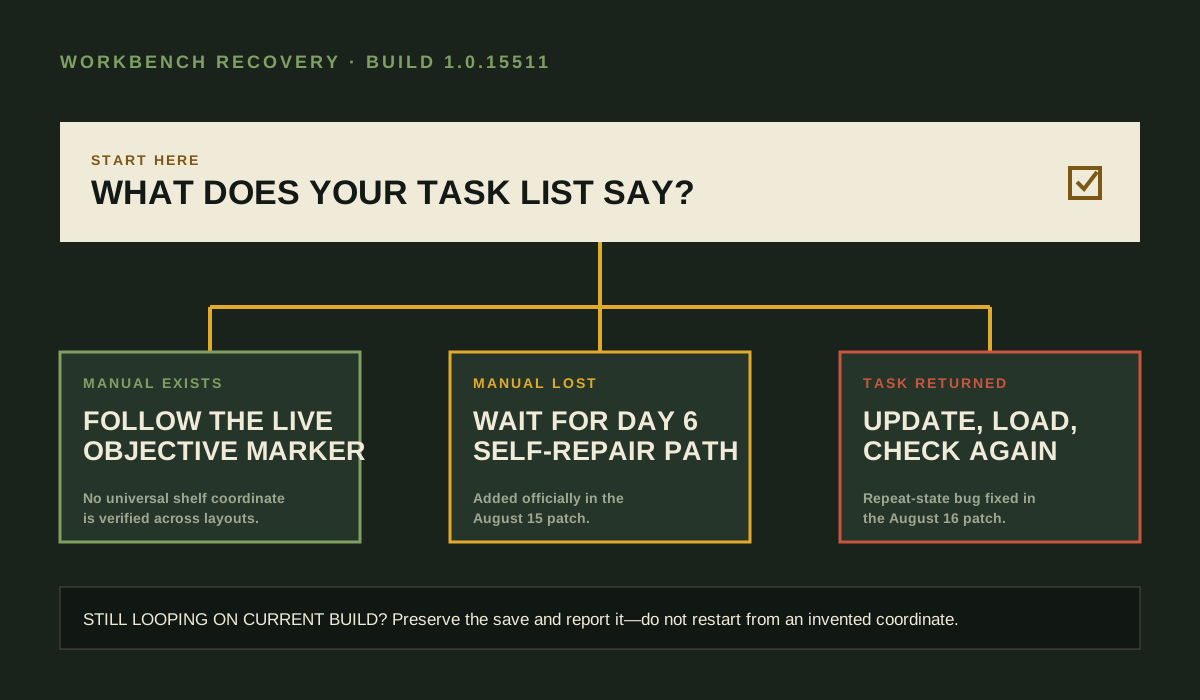
Select Search for Manual and follow its marker to the current destination. Existing guide pages do not establish one fixed shelf that applies to every character and layout.
- 04
If the manual was lost, advance to Day 6
The official August 15 patch added another path to discover the repair method yourself from Day 6. Use that path instead of restarting solely for the missing item.
- 05
If the objective returns after self-repair, update and reload
The official August 16 patch specifically fixed Search for Manual reappearing after self-repair. Load the save on a current build and re-check the task list.
- 06
Stop if the current build still loops
A repeated objective on the current build is not explained by the published patch notes. Preserve the save and report the bug through the developer's feedback link.
Keep beside the run
Field notes that change the decision
This is a recovery guide, not a location guess
The strongest current evidence is the official fallback and repeat-task fix. A precise location without a character-and-layout capture would be false confidence.
Day 6 is the earliest official fallback boundary
The patch says the additional self-discovery path starts on Day 6. It does not say the original manual must always be found before then.
Current builds include an Update Log
Build 1.0.15511 added an in-game update-log entry, making version checks easier before troubleshooting old behavior.
Not proven
What this page will not pretend to know
- No verified source establishes one universal manual coordinate for all characters and homes.
- The exact wording and timing of the Day 6 self-repair prompt can vary with task state.
- Old saves may retain state not reproduced by current clean saves.
Visible evidence
Sources behind this answer
- 01Official September 17 update ↗
Build 1.0.16756: defense-device hit detection and Drone status fixes; no replacement Workbench or Military Repair Kit trigger is listed.
official - 02Official August 15 update ↗
Added the Day 6 self-repair path after a manual is lost.
official - 03Official August 16 update ↗
Fixed Search for Manual reappearing after self-repair.
official - 04Independent Workbench Manual guide ↗
Confirms using the live objective marker instead of inventing a fixed coordinate.
editorial - 05Official September 12 update ↗
Build 1.0.16363 restores missing quest recipes or areas on affected save loads; it does not promise every manual-loss recovery.
official